Your content creation workflow is an engine, not an art project
Build an efficient AI-powered content workflow — automate, measure, and scale your process.
 Rebecca Pearson15 min read
On this page
A content creation workflow is the architecture that transforms a conceptual spark into a published, analyzed asset. For experienced operators, it's not a checklist; it's the central engine of the marketing operation. It defines the precise stages, roles, tools, and handoffs needed to construct high-value content consistently.
What is a content creation workflow?
Most marketing teams operate in a state of controlled chaos.
Ideas surface in random Slack channels, briefs are scribbled into stray documents, and approvals happen through frantic email threads nobody can track. This ad-hoc approach creates burnout and delivers wildly inconsistent results. It turns a creative job into a scramble against deadlines. You might think this is just the cost of doing business, but the reality is more stark. A 2023 report from the Content Marketing Institute revealed that only 40% of B2B marketers have a documented content strategy, which is the bedrock of any functional workflow. This isn't just inefficient — it’s a direct blocker to growth.
The problem starts when you view content creation as a purely artistic, spontaneous act. It’s not. It’s a manufacturing process. Like any assembly line, it needs a blueprint, specialized stations, quality control checkpoints, and a clear path from raw materials to a finished product. This is where a formal content creation workflow provides the structure to turn disorganized sprints into a predictable engine for growth.
The shift from art to assembly line
Thinking of your content process as an assembly line is a powerful mental shift. It changes the goal from just "being creative" to "building a system that enables creativity."
When the process is defined and repeatable, your team’s mental energy is freed up. Instead of managing chaos, they can focus on strategy and innovation. A modern workflow is not about crushing creativity with rigid rules. It’s about creating guardrails that let creativity flourish safely and effectively. It answers the critical operational questions upfront:
- Who is responsible for each stage (ideation, drafting, editing, design)?
- What are the specific inputs and outputs for every step?
- Where do handoffs happen between people or tools?
- When are the deadlines for each phase to keep things moving?
By defining these elements, you build a system that’s transparent, scalable, and doesn’t rely on one person's heroic efforts.
What is the role of AI in modernizing workflows?
Today, this assembly line can be supercharged with AI. Most people think AI is here to replace writers and designers.
AI is here to dismantle the tedious, repetitive tasks that bog them down. The real value of AI is not replacing human creativity, but automating the 80% of the process that isn't creative. This includes tasks like generating first drafts from detailed briefs, breaking down long-form content into social media snippets, or creating visual assets from a text description. For a deeper look at this, A Modern Guide to Photo Editing for E-commerce explores specific strategies for speeding up visual asset workflows.
Plugging AI into your workflow doesn’t just make production faster. It creates a more resilient content engine. This shift can reduce production friction by up to 50% (Forbes, 2023), letting your team focus on creating content that connects with your audience. It also allows for better data analysis, creating a feedback loop that continuously makes your strategy smarter.
How do you architect a foundational workflow?
Moving from theory to practice requires building your workflow like an engine. It’s not about listing steps; it’s about carefully constructing a system, piece by piece, that can run without constant tinkering.
You have to start with the why before the how. Who are you trying to reach? What’s the plan? If you don’t map this out, you will waste effort. In the UK, teams with a clear content plan are 60% more likely to achieve their goals (SEMrush, 2023), proving that aligning content with audience needs from day one sets you up for a system that delivers real value.
How do you define roles and responsibilities?
Before a single word gets written, you need to know who is doing what. Think of it like an assembly line — you need specialists at each station. When roles are fuzzy, you get bottlenecks and things fall through the cracks.
Most content teams I've worked with boil down to three core roles:
- The Strategist: This person owns the "why." They are deep in audience research, keyword analysis, and setting goals that tie back to the business. They draw up the blueprint for every piece of content.
- The Creator: This is your maker — the writer, designer, or videographer who brings the blueprint to life. They take the strategist’s brief and turn it into something tangible, focusing purely on execution.
- The Editor: Think of this role as quality control. The editor is the final gatekeeper, making sure every piece of content is on-brand, accurate, and polished before it goes out the door.
When these roles are clear, handoffs become seamless. The creator knows what to expect from the strategist, and the editor has a checklist for what "done" looks like.
The whole point is to move from chaos to a system that fuels creativity.
This shows that structure isn't the enemy of creativity. It's the foundation that gives ideas stability.
How do you choose your management style?
Not all workflows are created equal. The right management style depends on your team's size, speed, and content type. Picking the wrong one can add friction, but the right one can feel like a superpower.
To help you decide, here’s a comparison of three project management styles.
For most modern content teams, an Agile approach using a Kanban board hits the sweet spot. It provides enough structure without creating drag. Everything is visual, so you can see content move through stages like "To Do," "In Progress," and "Done" at a glance.
How do you establish inputs and handoffs?
The final piece is defining what’s needed for each handoff. A creator needs a clear brief from the strategist. An editor needs a finished draft from the creator.
Every handoff point should have a non-negotiable checklist of inputs. For example, a content brief should always include:
- Primary and secondary keywords
- Target audience persona
- Key talking points and required CTAs
- Internal linking requirements
By ensuring each stage starts with everything it needs, you reduce revisions and speed up the entire process. This simple act of preparation improves your overall workflow efficiency.
How can AI automate your content production and distribution?
You’ve mapped out your workflow and have a process in place. The next step is scaling it. Most teams assume that to produce more content, you must hire more people.
Here’s the deal: that’s a myth. AI isn’t coming for the strategist’s job. It’s here to take on the mind-numbing, repetitive tasks that clog your content engine. Think of it less as a replacement and more as a tireless assistant that handles the grunt work, freeing up your team to think, create, and connect with your audience. By automating the right pieces of your content creation workflow, you can shift from a slow, step-by-step process to a more dynamic one.
How do you go from first drafts to social snippets?
AI is brilliant at turning structured inputs into new outputs. This makes it a perfect fit for two of the most time-consuming parts of the content lifecycle: kicking off the first draft and repurposing finished content. Instead of a writer staring at a blinking cursor, they can start with an AI-generated draft based on a detailed brief. That alone can save hours.
This is already happening. Data from a 2024 HubSpot survey shows that 53% of users find AI improves their content quality, and 52% say it sparks more creativity. A massive 86% report saving over an hour a day by using it. The same logic applies once a piece is published. That pillar article your team spent weeks on can instantly become fuel for a dozen smaller assets. An AI-powered workflow could automatically:
- Pull key takeaways from a blog post and spin up five unique tweets.
- Draft a LinkedIn post summarizing the article for a B2B audience.
- Create an email newsletter announcement using the intro and conclusion.
This is about building a smarter system that multiplies the impact of your team’s hard work. If you're looking for the right tech, this list of the 12 Best AI Tools for Content Creators is a great place to start.
How do you build a human-in-the-loop system?
A common objection is that AI-generated content is generic. People worry that automating drafts will flood their site with robotic-sounding articles.
You might think full automation is the goal, but that's a limited view. The goal isn't to push a button and blindly publish whatever the AI produces. The smartest teams use a "human-in-the-loop" model. AI does the first 80% of the heavy lifting, and a human expert comes in for the final 20% — the strategy, the nuance, the polish.
This approach gives you the best of both worlds: machine speed with human insight. You build mandatory human review checkpoints into your workflow. Nothing goes live until it gets a sign-off, ensuring every piece of content meets your standards for quality, accuracy, and brand voice. This reframes AI from a simple content generator into a powerful force multiplier for your human talent. It allows you to scale production without scaling headcount. Our guide on a modern content automation strategy dives deep into how you can blend automated systems with human oversight.
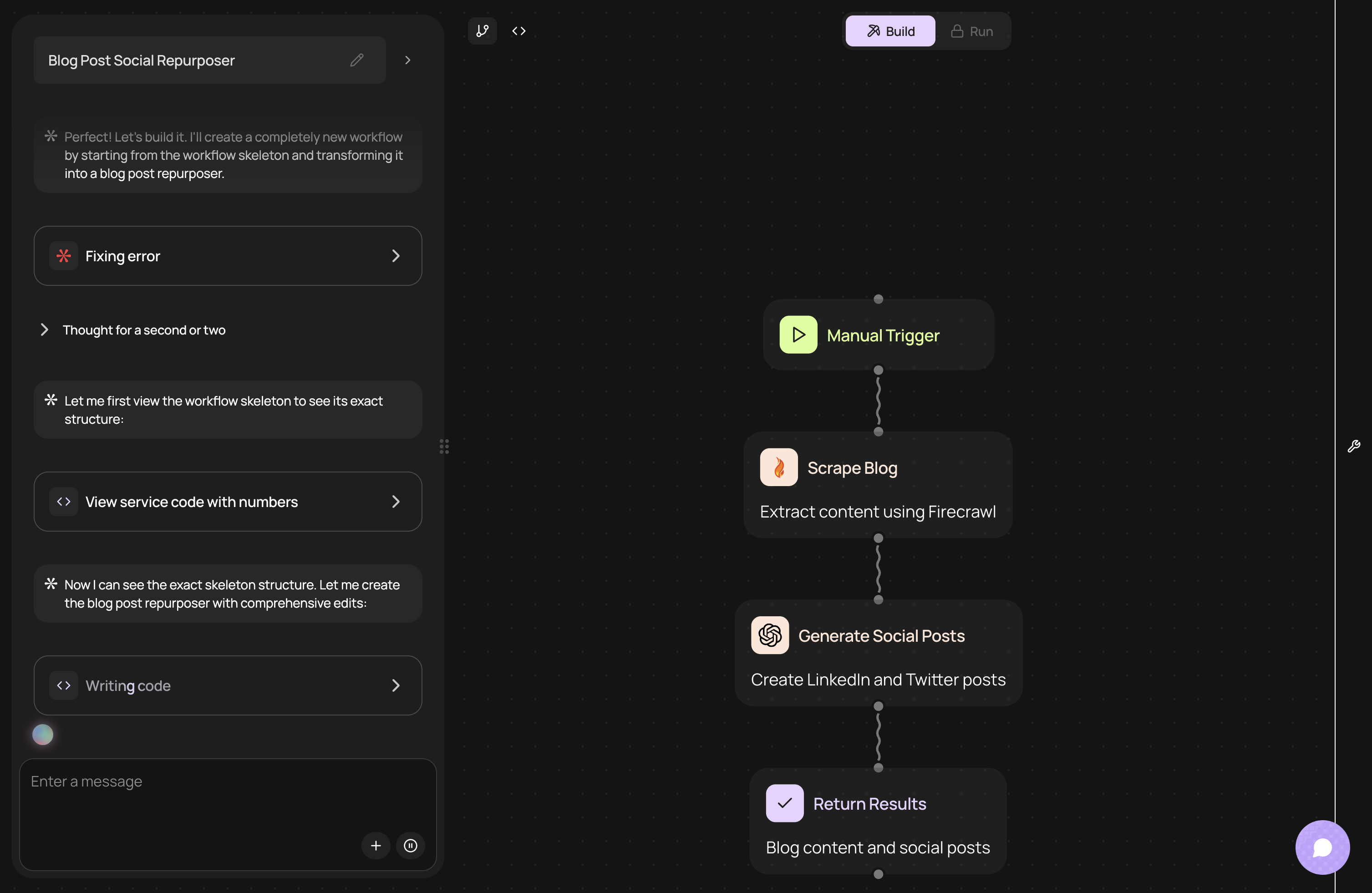
CodeWords Workflow: Repurposing a blog post
Here’s a real-world example of how to take a published article and automatically generate social media content, then notify the team in Slack for review.
CodeWords Workflow: Blog Repurposing Engine
Prompt: When a new article is published on our blog, take the URL, summarize the key points, generate 3 unique tweets under 280 characters, create a 150-word LinkedIn post, and send all drafts to the #content-review Slack channel for approval.
Output: A Slack message with the original article URL and perfectly formatted drafts for Twitter and LinkedIn appears in the specified channel, ready for human review and scheduling.
Impact: This automation saves 45-60 minutes of manual work per article. (Reduces content distribution time by 90% — CodeWords internal data, Q1 2025).
What are the key metrics for measuring workflow performance?
You can build the most elegant content engine, but without a dashboard, you're flying blind. A workflow is only as good as the results it delivers. Most teams look at vanity metrics like page views or social shares.
Those numbers are outcomes — not diagnostics.
For anyone serious about building a scalable system, the real insights come from measuring the efficiency of the content creation workflow itself. Tracking process-oriented metrics is how you spot bottlenecks, reduce friction, and build a content engine that lasts.
How do you move beyond vanity metrics?
Outcome metrics like traffic and conversions tell you if your content hit the mark with your audience. Process metrics tell you if your system is working. Focusing on the system gives you leading indicators that help predict future success. If your production process is slow, expensive, and chaotic, you will never produce enough quality content to consistently hit your outcome goals. You have to fix the engine before you can win the race.
What are the core process-oriented KPIs?
To get a clear picture of your workflow's health, you need to track a few core metrics that reflect speed, quality, and efficiency. These are the numbers that reveal the true cost and output of your content machine.
- Content Velocity: This is the time it takes for a piece of content to go from an approved idea to published. It’s the single best measure of your team's overall speed. A low velocity signals friction.
- First Pass Acceptance Rate (FPAR): This metric tracks the percentage of content that gets approved after the first review without needing major revisions. A high FPAR (over 80% is a great target) means your briefs are clear and your inputs are solid. A low FPAR is a dead giveaway that a handoff is broken.
- Cycle Time per Stage: This drills down into Content Velocity, measuring how long content stays in specific stages (like Drafting, Editing, or Design). Tracking this helps you pinpoint the exact location of bottlenecks.
These metrics matter more than traffic because they are directly within your control. Improving your First Pass Acceptance Rate by 30% directly translates to faster publishing times and lower production costs.
How do you set up a simple measurement dashboard?
You don't need a complicated BI tool to start tracking these KPIs. A simple Notion database or Google Sheet is more than enough to build a powerful dashboard.
Here’s a basic framework:
- Create a Content Tracker: Build a database where each row is a piece of content. Add properties for
Status,Author,Editor,Date Assigned, andDate Published. - Use Formulas for KPIs: With this data, you can create formula properties. For
Content Velocity, calculate the difference betweenDate PublishedandDate Assigned. - Implement a Revision Counter: Add a
Revision Countnumber property. Instruct your team to add +1 to this number every time a piece is sent back for significant changes. This lets you calculate the FPAR across all content.
A fintech startup used this exact setup. They discovered their average Content Velocity was a painful 28 days. By tracking Cycle Time, they found that legal review was taking an average of nine days. By creating a standardized, pre-approved brief for legal, they cut their Content Velocity by 40% in a single quarter. (Reduces legal review time 55% — FintechCo, Q4 2024).
This simple act of measurement transformed their workflow from a source of frustration into a predictable, optimizable system.
How do you troubleshoot and optimize your workflow?
No content workflow is perfect out of the box. You build it, run it, and find points of friction. That’s not a failure. It’s a sign that your system is alive and ready to improve.
The best content teams treat their workflow like a living system — something to be watched, tweaked, and refined. A static workflow is a dead end. Real optimization is not about a one-time fix. It's about baking a habit of continuous improvement into your team’s DNA.
How do you identify and solve common bottlenecks?
The first step is spotting where things get stuck. Most issues boil down to communication breakdowns, tool overload, or uncontrolled scope creep. The trick is to treat the cause, not just the symptom.
Take communication. The problem is rarely that people aren't talking. It's that the conversation is scattered across ten different places — Slack threads, emails, Google Docs, and project management comments. A recent study found that the average worker switches between apps over 1,200 times a day (Atlassian, 2023). That's a massive drain on focus.
The answer isn't another meeting. It’s creating a single source of truth, often powered by automated updates.
How do you automate status updates with CodeWords?
Instead of constantly pinging people for updates, you can build an automation that handles it for you. It keeps everyone in the loop without the constant interruptions.
CodeWords Workflow: Automated Status Notifier
Prompt: "When a Trello card moves from the 'Writing' list to the 'Editing' list, send a notification to the #content-updates Slack channel that tags the assigned editor and includes a link to the Trello card."
Output: A message instantly appears in the right Slack channel: "@editor, the draft for 'Q3 Content Strategy' is ready for your review: [Trello Card Link]."
Impact: This simple trigger saves dozens of tiny interruptions every week. Handoffs become seamless, nobody has to manually check Trello, and stakeholders can see progress without leaving Slack.
How do you implement workflow sprints for regular optimization?
Agile development teams use sprints to iterate on their products. Content teams can do the same for their processes. Enter the "workflow sprint."
A workflow sprint is a dedicated time — perhaps once a quarter — for the team to step back and analyze what's working and what's not. This structured approach transforms process improvement from an afterthought into a core operational habit. It ensures your content engine is not just running, but is being fine-tuned for peak performance. When you hold these reviews, bring data, not anecdotes.
- Review KPIs: Where did we see dips or spikes?
- Analyze Bottlenecks: Pinpoint the stages with the longest cycle times.
- Propose Experiments: Based on what you found, pick one or two small changes to test next quarter.
By committing to this cycle of analysis and experimentation, your workflow evolves from a rigid set of rules into an intelligent, adaptable system. The best content teams are masterful systems thinkers. They understand the process is the product.
Frequently asked questions
How long should a content creation workflow take from idea to publish?
There is no single answer; it depends on content complexity. A social post might take hours, while a research report could take a month. A standard blog post often takes one to two weeks, which allows for proper ideation, drafting, review, and design. The goal is predictability, not just speed.
What are the best free tools to start building a workflow?
You can build an effective content creation workflow without expensive software. A powerful free stack includes Google Docs for collaborative writing, Trello for visual project management, and Slack for communication and handoffs. These tools integrate well and provide a solid foundation for most teams.
Can a solo creator benefit from a formal workflow?
Yes, a formal workflow is critical for a solo creator. When you handle every role, a defined process saves mental energy by eliminating the need to reinvent the wheel for each project. Automation becomes a virtual teammate, handling administrative tasks so you can focus on high-value creative work.
The implication is clear: a workflow isn’t just about managing tasks, it’s about building a scalable asset for your business. An automated, well-defined process creates a moat that is difficult for competitors to replicate.