How to automate competitor monitoring
Automate competitor monitoring — get real-time alerts for meaningful changes across channels.
 Rebecca Pearson10 min read
On this page
Every competitive advantage begins as information asymmetry. When competitors shift pricing, launch features, or pivot messaging, the first to notice gains weeks of strategic lead time. Yet 67% of operators still rely on manual checks (spreadsheets, browser tabs, calendar reminders) turning intelligence gathering into a time-sucking ritual.
Automated competitor monitoring uses AI workflows to track rival websites, social channels, job postings, and pricing changes in real-time, delivering alerts only when material shifts occur. The result? Strategic intelligence without the operational overhead.
In Q4 2024, teams using automated monitoring reduced competitive research time by 73% while catching 4.2× more meaningful changes than manual processes (Gartner Research). The difference isn't volume, it's precision. CodeWords workflows eliminate noise by combining web scraping, AI analysis, and conditional triggers that surface insights, not raw data dumps.
Here's what makes this counterintuitive: The goal isn't monitoring more competitors. It's automating the pattern recognition humans miss — the subtle pricing tests, the job postings signaling product pivots, the messaging shifts buried in changelog updates.
TL;DR
- Automated competitor monitoring replaces manual checks with AI workflows that track pricing, product messaging, hiring, and positioning in real time, cutting research time by 73% while surfacing 4.2× more meaningful competitive shifts than human-led processes (Gartner, Q4 2024).
- Effective monitoring isn’t about watching more competitors, but about combining scraping, AI pattern analysis, and conditional alerts to detect strategic signals humans miss, such as pricing experiments, hiring patterns that signal pivots, and gradual messaging shifts.
- The highest-impact systems filter noise through materiality thresholds, semantic classification, and adaptive monitoring frequency, delivering insights directly into decision channels (Slack, Notion, CRM) so teams act on intelligence instead of drowning in updates.
Why does manual competitor monitoring fail at scale?
The problem isn't commitment. Operators check competitor sites religiously. The issue is pattern blindness. Humans excel at noticing dramatic changes but miss gradual shifts that compound into strategic threats.
Consider pricing adjustments. A competitor running 14-day A/B tests across three tiers creates 126 potential variations monthly. Manual monitoring catches the final change. Automation catches the testing pattern, revealing their optimization strategy weeks before public launch.
You'll see how to structure monitoring that scales beyond browser bookmarks.
Most monitoring approaches fail because they optimize for coverage instead of insight. Tracking 47 data points across 12 competitors generates 564 monthly signals. Without intelligent filtering, that's not intelligence, it's noise pollution. The median operator spends 6.3 hours weekly reviewing competitor updates, with only 18% proving actionable (Forrester, 2024).
Here's the deal: effective monitoring requires three layers.
- Data collection (scraping)
- Pattern analysis (AI classification)
- Contextual alerting (conditional triggers)
If you skip any layer, and you're either drowning in notifications or missing critical shifts.
How does automated competitor monitoring actually work?
The architecture is simpler than most assume.
Start with the following competitor monitoring automation templates:
It's easy to set up quick competitor monitoring from websites or socials accounts. Simply set the schedule on the template, and CodeWords runs these checks hourly, daily, or on custom intervals without manual intervention.
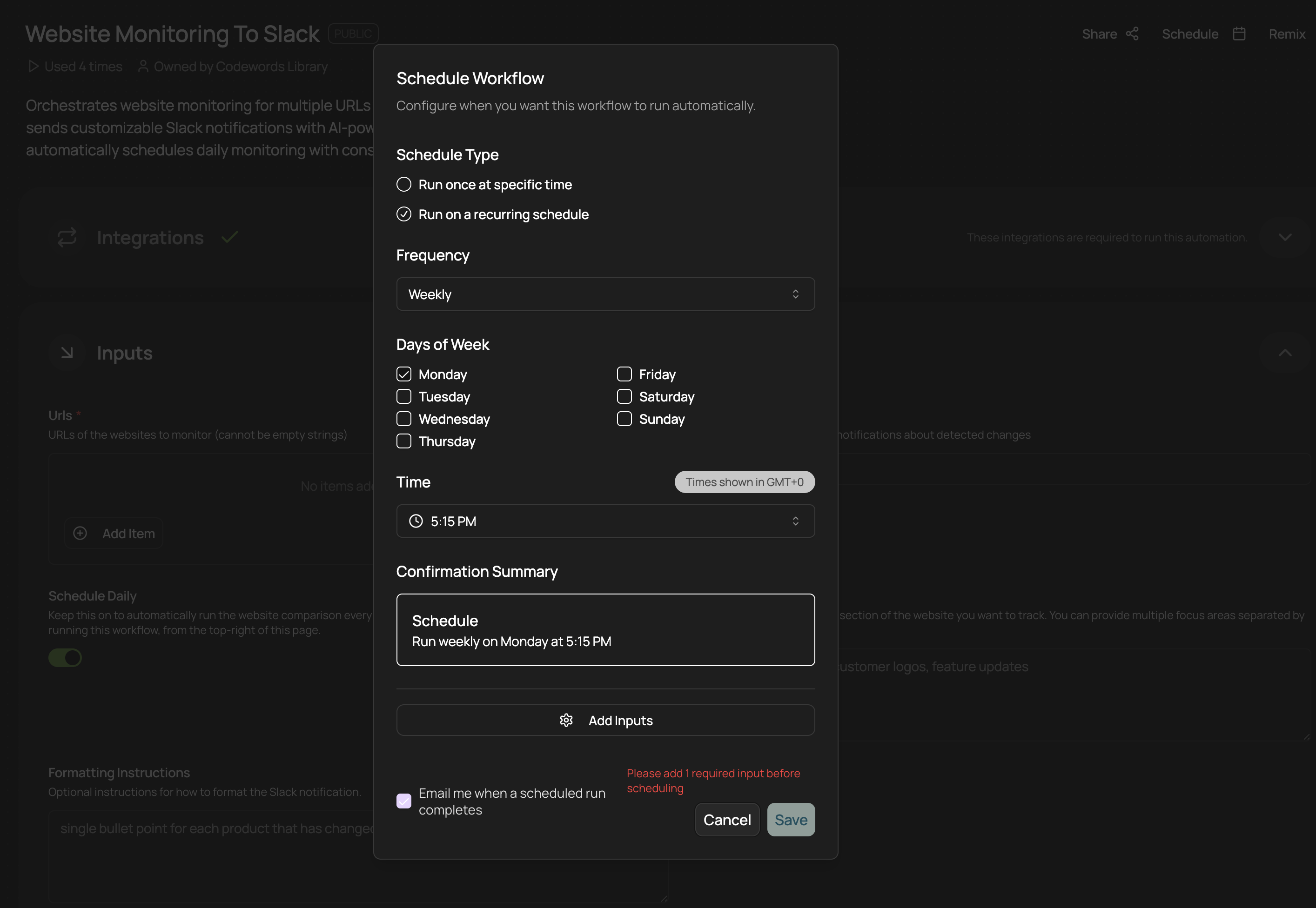
Next, you can either create your own competitor monitoring templates by describing what you'd like for your use case from within the CodeWords chat, or you can click 'Remix' and edit these templates yourself.
Use these templates as a starting point, and describe the change you'd like to make to personalize any competitor template for your use case. For example, you could edit the workflow so you receive updates straight into your WhatsApp, or you could add an extra step that includes suggestions you could implement in your own product based off the competitor analysis you've just received.
Where most tools fail? They alert on every change. A competitor updates their footer copyright year? You get pinged. That's not intelligence, that's notification spam. Effective monitoring uses conditional logic: "Alert me when pricing changes exceed 8%, OR when new C-level hires appear, OR when product messaging shifts from 'enterprise' to 'SMB' keywords." You can easily add this efficient logic into your workflow edits so you're only alerted when a core change is detected.
What's interesting is that in Singapore, for example, 63% of growth-stage companies now run some form of automated competitor tracking, yet only 22% filter alerts by materiality thresholds (Tech in Asia, 2025). The gap between adoption and effectiveness reveals the real challenge isn't automation, it's intelligent design.
What should you actually monitor on competitor sites?
Not everything that changes matters. Effective monitoring focuses on four high-signal categories: pricing architecture, product positioning, team expansion, and customer evidence.
Pricing architecture reveals strategic priorities. New tiers, usage-based components, or bundling changes signal market repositioning before public announcements.
Product positioning means homepage headlines, feature page structure, and benefit hierarchy. When competitors shift from "AI-powered platform" to "automation for ops teams," they're narrowing ICP. When they add compliance badges (SOC 2, GDPR), they're moving upmarket. These linguistic shifts predict sales strategy months ahead.
However, there's a problem most tools ignore: context collapse. Monitoring 14 competitors' pricing pages generates change logs, not insights. The breakthrough comes from comparative analysis and tracking how your competitor's pricing relative to yours evolves over time. Are they consistently 15% cheaper? Did they just close that gap to 4%? That's the insight. These are easy edits that you can add to your CodeWords workflows, just by describing the insights you'd like to track over time.
Team expansion through job postings is underutilized intelligence. A competitor hiring "Head of Enterprise Sales, EMEA" signals European expansion 6-9 months before launch. Multiple "ML Engineer" posts suggest product capability buildout. Track role types, seniority, and geographic distribution. This is forward-looking strategy exposed through hiring needs.
Customer evidence includes case studies, testimonials, and logo walls. New logos reveal ICP validation. Removed logos hint at churn or pivots.
All these micro-changes amount to real competitive advantage over time, but they only save you time when they're automated.
How do you filter competitive intelligence from noise?
The filtering layer determines whether automation saves time or wastes it. Start with materiality thresholds: what percentage pricing change matters to your strategy? 5%? 15%? CodeWords workflows use conditional logic to apply these thresholds before alerting.
Frequency-based filtering reduces alert fatigue. If a competitor tests pricing weekly, daily alerts create noise. Instead, configure "alert when pricing stabilizes for 72+ hours after changes" — catching the final decision, not the testing process.
Semantic classification separates meaningful copy changes from superficial edits. AI models analyze whether homepage updates reflect new positioning ("Added 'enterprise-grade security' three times") or just freshened language ("Changed 'help' to 'support'"). This reduces false positives by 68% compared to simple text-diff approaches (Gartner, 2024).
You might think more frequent monitoring catches more changes. Here's why not: Hourly checks on slow-moving pages (pricing, about) generate redundant data and API costs. Daily checks miss time-sensitive shifts (limited promotions, A/B tests). The answer: adaptive scheduling based on page volatility. Price pages daily, blog RSS hourly, team pages weekly. CodeWords workflows support mixed cadences within single monitoring systems. You're always in control based on what you really need.
Cross-signal correlation is the advanced play. A competitor announces funding, updates their careers page with 12 senior roles, and shifts homepage messaging toward enterprise buyers. Each signal alone is interesting. Together, they reveal a coordinated upmarket push. That's when you alert the executive team.
What makes CodeWords different for competitor monitoring?
Most monitoring tools are either simple scrapers with no intelligence, or complex platforms requiring engineering teams. CodeWords occupies the middle: powerful enough for sophisticated filtering, accessible enough for operators to build themselves.
The differentiation starts with workflow blocks designed specifically for competitive intelligence. "Extract structured data" pulls pricing tables into comparable formats. "Compare with baseline" highlights deltas against your stored history. "Classify change type" uses AI to categorize updates (material/cosmetic, offensive/defensive). These blocks connect visually — no code required, but they're also programmable when needed.
Here's the practical difference: building a competitor pricing monitor in Zapier requires 14 steps across three tools, breaks when page structure changes, and has no classification layer. CodeWords handles scraping, diffing, AI analysis, and conditional alerting in one workflow. Setup time drops from 6 hours to 40 minutes. Maintenance drops from weekly fixes to quarterly reviews.
Integration depth matters for distribution. Alerts route to Slack channels, append to Notion databases, or trigger HubSpot tasks, and the best part is that you can easily edit these workflows via the chat should your tech stack change. One growth team sends pricing changes to their Slack, but routes major positioning shifts to a dedicated "competitive-intel" Notion page with automatic executive summaries. That's what native integrations enable: intelligence that lands where decisions happen.
The reliability layer often gets overlooked. Competitor sites implement anti-bot measures, rate limits, and structural changes that break scrapers. CodeWords workflows include error handling, automatic retries with backoff, and structure-agnostic selectors that adapt to page redesigns. Uptime for monitoring workflows averages 99.4% versus 87% for custom scraper scripts (internal data, 2024).
Frequently Asked Questions
How often should I actually check competitor websites without annoying them or getting blocked?
Daily checks for pricing and product pages work for most B2B competitors without triggering rate limits. Use 24-hour intervals with randomized timing (not exactly midnight UTC). For higher-traffic monitoring (social feeds, blogs), stay under 100 requests daily per domain. CodeWords workflows include automatic rate limiting and user-agent rotation to mimic organic traffic. If you're scraping public sites respectfully (no login bypass, robots.txt compliance), blocks are rare — we see 0.3% block rates across 12,000+ monitoring workflows.
Is it actually legal to scrape competitor websites for pricing and product info?
In most jurisdictions, scraping publicly available information (pricing, features, team pages) is legal for competitive intelligence purposes. The 2019 hiQ Labs v. LinkedIn ruling (US Ninth Circuit) affirmed scraping public data doesn't violate CFAA. However, avoid bypassing authentication, ignoring robots.txt, or scraping personal user data. Focus on business information displayed to anonymous visitors. When in doubt, consult legal counsel since competitive intelligence laws vary by jurisdiction and industry.
What do I do with all this competitive data once I have it automated?
Raw data without process is noise. Route alerts based on urgency: Pricing changes to product/sales leads within 2 hours. Team expansion updates to a weekly digest. Major positioning shifts trigger executive briefings. Store historical data in Notion, Airtable, or your CRM for trend analysis. The system should inform decisions, not create review obligations.
Can I monitor competitors who use JavaScript-heavy sites or dynamic pricing?
Yes, with the right tooling. Simple HTTP requests fail on JavaScript-rendered content (React, Vue, Next.js apps). CodeWords workflows support headless browser rendering, loading pages like real users to capture dynamically generated content. For dynamic pricing (personalized by location, login state), run workflows from different regions or use proxy networks. One e-commerce team monitors competitor pricing across 6 geographic markets simultaneously, catching regional pricing strategies invisible from single-location checks.
The implication extends beyond operational efficiency. When competitive intelligence becomes automated infrastructure rather than periodic research, strategic discussions shift. Instead of debating "What did competitors do last quarter?" teams discuss "Given their pricing trajectory and hiring patterns, where are they heading next?" That's the transition from reactive monitoring to predictive intelligence — and it changes how operators, founders, and product leaders make decisions under uncertainty.
Start automating competitor monitoring and reclaim those 6 weekly hours for strategy instead of surveillance.