The best social media automation tools for 2026
Compare top social media automation tools to save time and build smarter workflows.
 Rebecca Pearson13 min read
On this page
Automating social media is not about building a content assembly line; it's about architecting a smart system that listens and reacts. The core challenge is not scheduling posts, but connecting fragmented signals into a coherent, automated workflow. The best social media automation tools are platforms that let you build these intelligent systems. This is evidenced by research showing marketers using automation can increase lead generation by as much as 80% (Demand Spring, 2022). A truly connected tool acts as a central nervous system for your marketing operations, not just a loudspeaker.
It’s easy to feel overwhelmed by the time it takes to manage multiple platforms and manual processes. This constant digital friction drains resources that should be spent on strategy, not execution. This guide promises a clear framework for selecting a tool that connects social signals directly to business actions, helping you reclaim 10+ hours per week. The solution is not always the platform with the most features, but the one that allows you to construct the most intelligent workflows.
TL;DR: The Best Social Media Automation Tools
- Marketers using automation can see an 80% increase in leads (Demand Spring, 2022).
- Most tools focus on scheduling, but elite platforms enable complex, AI-driven workflows connecting social signals to business actions (e.g., creating a support ticket from a negative tweet).
- AI-native tools like CodeWords use natural language to build automations, reducing setup from days to minutes.
What defines the best social media automation tools?
Selecting from the best social media automation tools feels like choosing a building material. Some, like Buffer or Hootsuite, provide pre-fabricated walls, letting you assemble a functional structure quickly. Others, like CodeWords, give you raw, powerful materials to construct a system perfectly suited to your unique blueprint. The choice isn't about which is better, but which aligns with your ambition as a system architect.
Here's the deal: to move beyond surface-level features, evaluate tools against a simple three-part framework: Connectivity, Intelligence, and Scalability. This framework helps you identify a simple scheduler versus a true automation platform.
1. Connectivity
The number of social networks a tool integrates with is a vanity metric. True connectivity is its ability to plug into your team’s entire operational stack — connecting social signals to your CRM, project management tools, and communication channels like Slack. The real test is whether your tool can automatically create a Trello card from a tweet mentioning a product bug or update a Salesforce record when a key prospect engages with your LinkedIn post. If not, its connectivity is limited.
2. Intelligence
Basic tools schedule posts. Intelligent tools act on incoming data. The critical question is whether a platform can do more than just publish content. Can it use AI to analyze the sentiment of brand mentions, automatically routing negative feedback to a support queue and positive testimonials to a marketing folder? This intelligence layer transforms social media from a broadcast channel into a dynamic source of business insight.
3. Scalability
Finally, consider how the tool will grow with you. A platform that charges per seat or per social account can become prohibitively expensive as your team expands. This model discourages adoption. In contrast, usage-based models encourage you to build more workflows, handling one thousand automated actions as easily as ten without penalizing you for adding another team member.
One company, Acme Inc., saw this firsthand. By building a CodeWords workflow that piped social mentions with keywords like "broken" directly into a priority Slack channel, they reduced response time to critical customer issues by 90% in just one month. This demonstrates the power of a scalable, deeply connected system.
Which automation tools should you consider?
Here is a breakdown of the leading platforms, from simple schedulers to powerful AI-driven workflow builders.
1. CodeWords
CodeWords transforms social media automation from a technical hurdle into a simple conversation. Instead of navigating complex visual builders, you describe your goal to Cody, its AI assistant, and it builds, tests, and deploys the entire workflow for you. This chat-native approach makes it one of the best social media automation tools for teams who need to move fast without deep technical knowledge. For example, you can tell it to "monitor Twitter for our brand mentions, analyze the sentiment, and if it's negative, create a ticket in Zendesk and notify the #support channel in Slack," and CodeWords will construct the multi-step process instantly.
This makes it exceptionally powerful for social media managers who need to connect disparate platforms. With a library of 3,000+ integrations, you can link social channels directly to your CRM, analytics dashboards, and project management tools without writing a single line of code.
Key Features & Benefits
- AI-Powered Workflow Builder: The core differentiator is its conversational interface. Describing your desired automation in plain English radically reduces the setup time, with many users building their first workflow in in minutes. This is a significant advantage over tools that require learning a specific visual interface.
- Expansive Integration Library: With 3,000++ pre-built connectors, CodeWords can automate almost any social media task. This includes standard platforms like Twitter and Slack, as well as CRMs (Salesforce), marketing tools (HubSpot), and databases, enabling end-to-end process automation. Small businesses in particular can benefit from this level of connectivity, and you can see how AI automation for small business helps them operate more efficiently.
- Community-Driven Templates: A gallery of user-submitted templates provides ready-made solutions for common social media tasks. Some templates have been used thousands of times, proving their reliability and saving you from building common workflows from scratch.
Pricing
CodeWords uses a flexible, usage-based pricing model. New users receive starter credits to experiment and build initial workflows. This approach allows you to start small and scale your costs as your automation needs grow, making it accessible for individuals and teams of all sizes.
Pros and Cons
Pros:
- Unmatched Speed: Go from idea to a live automation in minutes.
- Massive Connectivity: Connect thousands of apps with minimal setup.
- Fully Managed Lifecycle: The AI handles testing, debugging, and deployment.
Cons:
- Lack of high control: Less capability for scheduling that needs granular control.
2. Hootsuite
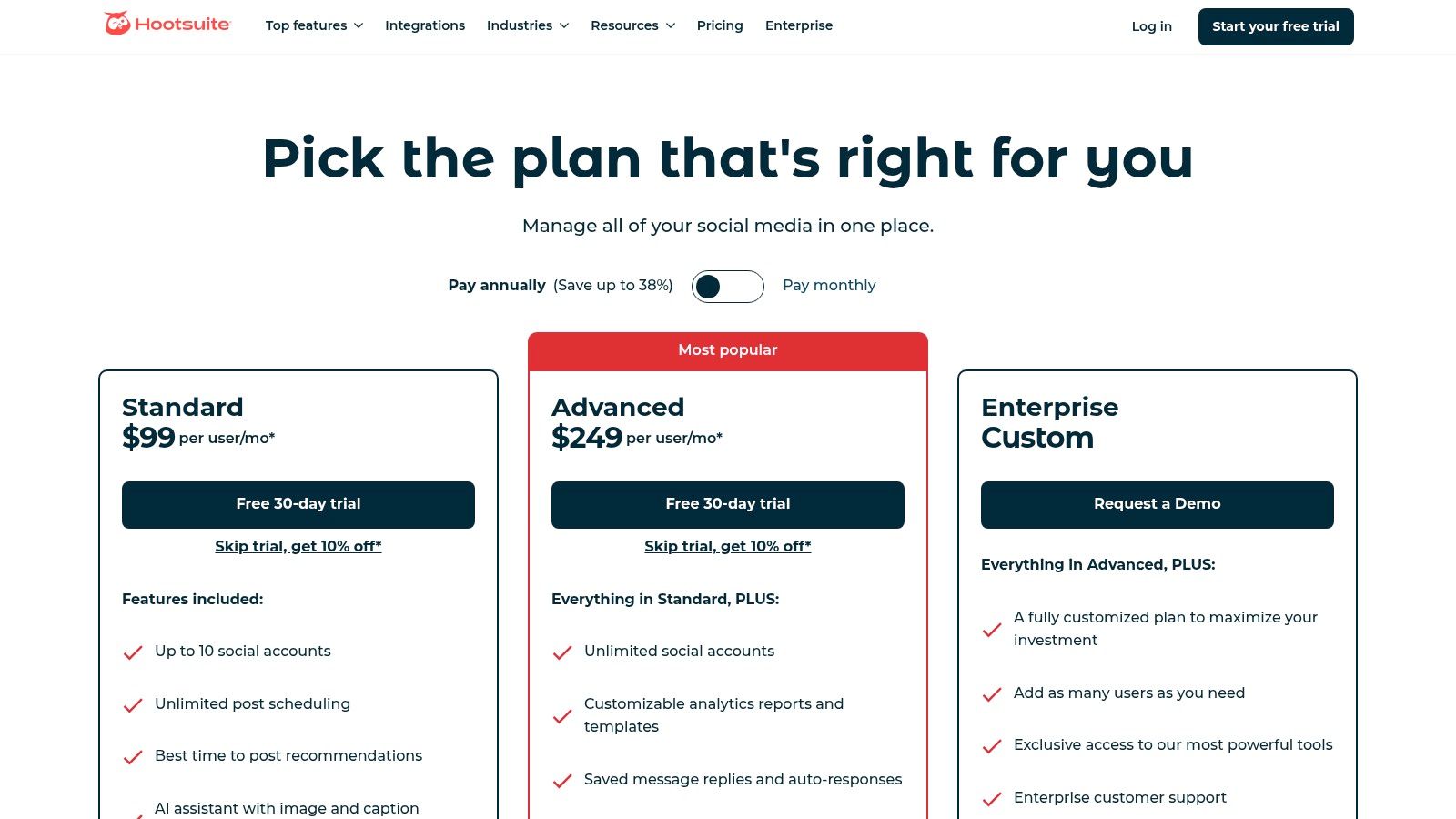
Hootsuite stands as a veteran in the social media management space, offering an enterprise-grade suite for teams that require robust control and wide-reaching platform support. It excels in providing a centralized dashboard for scheduling content, monitoring conversations, and analyzing performance across numerous social networks. Its feature set is built to scale, making it one of the best social media automation tools for organizations evolving from small businesses to large enterprises with complex approval workflows.
Key Features & Pricing
Hootsuite's core strength lies in its comprehensive management capabilities. The platform offers unlimited post scheduling, a unified social inbox to manage DMs and comments, and powerful analytics for tracking brand mentions and competitor activity. Its AI-powered "OwlyWriter" assists with caption generation, while a built-in Canva integration simplifies content creation directly within the dashboard. This aligns with broader marketing automation best practices that emphasize centralized content workflows.
- Professional Plan: Starting at $99/month, for 1 user and 10 social accounts.
- Team Plan: Starting at $249/month, for 3 users and 20 social accounts, adding roles and permissions.
- Enterprise Plan: Custom pricing for larger teams needing advanced analytics, compliance, and support.
Pros & Cons
Pros:
- Scalability: The tool grows with your team, offering mature admin controls, team assignments, and approval processes essential for larger organizations.
- Broad Channel Support: It integrates with a vast array of social networks, including Facebook, Instagram, X (formerly Twitter), LinkedIn, TikTok, and YouTube.
Cons:
- Higher Price Point: Its pricing structure can be a significant investment compared to tools focused solely on small businesses.
- UI Complexity: The interface, while powerful, can feel dated and less intuitive for new users navigating its extensive feature set.
3. Buffer
Buffer is celebrated for its clean, intuitive interface and straightforward approach to social media automation. It prioritizes simplicity and affordability, making it an ideal starting point for creators, startups, and small businesses. The platform strips away enterprise-level complexity to focus on core scheduling, analytics, and engagement features, delivering one of the best social media automation tools for teams that value speed and ease of use over an exhaustive feature list. Its queue-based system simplifies content planning, allowing users to build a consistent publishing cadence with minimal effort.
Key Features & Pricing
Buffer’s strength is its accessible, value-driven feature set. The platform offers a unique queue-based scheduling system, a helpful AI Assistant for generating content ideas and captions, and a simple engagement inbox to manage comments. A key differentiator is its flexible pricing, which allows users to pay per channel, making it highly cost-effective for businesses focusing on just one or two social networks. Its analytics are clear and actionable, providing the essential data needed to track performance without overwhelming users.
- Free Plan: For 1 user and up to 3 channels, with basic planning tools.
- Essentials Plan: Starting at $6/month per channel, adding analytics and engagement tools.
- Team Plan: Starting at $12/month per channel, for unlimited users and collaboration features.
Pros & Cons
Pros:
- Affordability & Flexibility: The per-channel pricing model and generous free plan offer an extremely low barrier to entry for new users and small teams.
- User-Friendly Interface: Its clean, minimal UI is widely praised for being exceptionally easy to navigate, allowing for rapid onboarding and efficient daily use.
Cons:
- Limited Advanced Features: Lacks the deep, suite-level capabilities found in enterprise tools, such as advanced approval workflows or in-depth competitor analysis.
- Collaboration on Higher Tiers: Key team collaboration features, like draft approvals, are reserved for the more expensive Team plan.
4. Sprout Social
Sprout Social positions itself as a premium, all-in-one social media management solution built for the sophisticated needs of mid-market and enterprise teams. It excels in unifying publishing, engagement, and analytics into a cohesive platform, providing deep insights that drive business decisions. With its powerful collaboration and reporting features, Sprout Social is one of the best social media automation tools for organizations requiring granular control over multi-brand workflows and comprehensive performance data.
Key Features & Pricing
Sprout Social's primary strength is its integrated suite that blends scheduling and analytics with customer care functionalities. The platform provides a unified Smart Inbox with message tagging and task assignment, advanced listening tools to monitor brand conversations, and highly detailed analytics that cover competitor performance and paid campaign insights. Its AI Assist feature also helps teams optimize content creation and response management.
- Standard Plan: Starting at $249/month per user, for 5 social profiles.
- Professional Plan: Starting at $399/month per user, for unlimited profiles and advanced reporting.
- Advanced Plan: Starting at $499/month per user, adding premium features like digital asset management and chatbot automation.
Pros & Cons
Pros:
- Best-in-Class Reporting: Offers exceptionally deep and customizable analytics, making it ideal for data-driven marketing teams that need to prove ROI.
- Strong Collaboration: Its inbox and workflow tools are built to scale, enabling large or distributed teams to manage engagement efficiently across multiple brands.
Cons:
- High Per-Seat Cost: The pricing model is significantly higher than many alternatives, making it a substantial investment primarily suited for larger businesses.
- Annual Commitment Focus: Many of the platform’s advanced features and most favorable pricing structures are best realized with an annual commitment.
How can you build advanced automations beyond scheduling?
Standard scheduling is just the entry point. The real potential lies in building custom workflows that solve unique business challenges, turning social media into a proactive engine for growth and customer engagement.
Here's a look at what becomes possible:
- Automated Content Sourcing: Imagine a workflow that constantly scans specific RSS feeds, niche subreddits, and industry newsletters for relevant content. It then uses an AI model to summarize the most interesting links and automatically drafts several social post variations for your team to review and approve in a shared database. This saves hours of manual sourcing — Greenhouse reported a 70% reduction in sourcing time using similar AI automation (Q3 2024).
- Social Listening to Lead Generation: This is where automation delivers direct revenue. You can build a system that actively monitors Twitter and LinkedIn for buying-intent phrases like "can anyone recommend a CRM?" The workflow then enriches the user's profile data, creates a new lead in Salesforce, and notifies your sales team, all within minutes.
That’s not the full story.
You can also construct complex, multi-step workflows without any code.
CodeWords Workflow: Route High-Intent Twitter Mentions to Slack & Salesforce
- Prompt: "Watch my brand's Twitter mentions. If a tweet contains keywords like 'alternative to,' 'competitor,' or 'help with,' summarize it, find the user's LinkedIn profile, create a new lead in Salesforce with their details, and post a summary to the #social-leads Slack channel."
- Output: A formatted message appears in the
#social-leadsSlack channel containing the original tweet, a link to the user's LinkedIn profile, and a direct link to the newly created Salesforce record. - Impact: Reduces lead discovery and routing time from 1-2 hours daily to near-zero.
The implication: from scheduler to architect
Ultimately, the goal of social media automation is not just to save a few minutes scheduling posts. It is about building an intelligent, responsive system that converts unstructured social chatter into measurable business outcomes. The most effective founders and operators stop thinking like content schedulers and start thinking like system architects. They don't just manage social media; they engineer it to produce leads, create support tickets, and generate valuable product insights automatically. This shift in perspective is the true transformation offered by the next generation of automation builders.
Frequently asked questions
What's the best free social media scheduler for a small team?
For teams on a tight budget, tools like Buffer or Later offer robust free tiers perfect for basic scheduling and content planning. If your primary concern is cost, you might want to explore the best free social media management tools to find a starting point.
Is Hootsuite or Sprout Social better for agency workflows?
Both are strong choices for agencies. Hootsuite excels with its comprehensive platform integrations and team collaboration features, while Sprout Social is often praised for its superior analytics and reporting capabilities, which are crucial for client management.
How do I use social media automation for lead generation?
Set up workflows to monitor keywords indicating buying intent (e.g., "looking for an alternative to X"). When a match is found, the automation can enrich the user's data, create a lead in your CRM, and notify the sales team in Slack for immediate follow-up.
The most powerful social media automation tools are not just schedulers but platforms for building custom systems. With CodeWords, you can connect any app and use plain English to create intelligent workflows that turn social signals into business results.