A practical guide to AI workflow orchestration
Discover how AI workflow orchestration transforms scattered tasks into scalable systems. Learn the frameworks and patterns to automate complex processes.
 Rebecca Pearson13 min read
On this page
- What is workflow orchestration really?
- How does orchestration differ from automation and choreography?
- What are the core components of a modern orchestration system?
- How do businesses apply workflow orchestration?
- What are the best practices for implementing orchestration?
- FAQs about workflow orchestration
Fragmented tasks are the enemy of scale. You might have scripts, API calls, and SaaS tools all running efficiently on their own, but without a central nervous system, they create more chaos than cohesion. This guide will show you real CodeWords workflows — not just theory. Workflow orchestration is the practice of coordinating multiple, automated tasks across different systems to execute a complete, end-to-end business process. It’s the conductor that transforms isolated automations into a symphony. The global workflow orchestration market is projected to grow from $16.16 billion in 2024 to an estimated $42.76 billion by 2035, driven by the need for operational efficiency (source, 2024). This isn't just about connecting apps; it's about building a scalable digital assembly line for your entire operation.
Your team automates tasks in isolation, creating efficient silos that don't talk to each other. This leads to dropped handoffs, zero visibility into end-to-end processes, and a brittle system that breaks under pressure. The promise is a transition from manual oversight to a centrally managed, intelligent system that can reduce process cycle times by over 50%. The solution lies in a counterintuitive shift: focus on the connections between your automations, not just the automations themselves.
TL;DR
- The workflow orchestration market is set to grow from $16.16 billion in 2024 to $42.76 billion by 2035, driven by the demand for AI-powered efficiency (Precedence Research, 2024).
- Orchestration is a centralized control layer for end-to-end processes, unlike task automation (single task) or choreography (decentralized).
- Unlike generic advice, this guide provides concrete CodeWords workflow examples for real-world application.
What is workflow orchestration really?
Think of workflow orchestration as a conductor leading a symphony. Each musician represents a single automated task — a script, an API call, or a database update. Individually, they are just isolated notes. When the conductor guides them with a clear sequence and timing, they create a cohesive musical piece. That is what workflow orchestration does for your business processes.
It weaves disparate digital threads into a functional fabric. This moves you beyond juggling fragmented tools and siloed data. You might think adding more standalone automations is the path to scale. However, there’s a problem most tools ignore: disconnected automations create hidden complexity and points of failure. The real value is in intelligent coordination.
Here's the deal: so many teams fall into the trap of building automations in isolation. A script sends welcome emails, and another creates a user account in a different system. While each one works, the overall process is clunky and requires manual intervention to connect the dots.
This fragmented approach creates significant issues:
- Zero Visibility: It is nearly impossible to track the status of a complete process when its components are scattered across different platforms.
- Brittle Error Handling: If one step in a multi-part process fails, the entire sequence can halt without a central manager to detect the error and initiate a recovery action.
- Poor Scalability: As a business grows, layering on more standalone automations results in a tangled, unmaintainable system that is difficult to modify or debug.
Workflow orchestration addresses these challenges by implementing a central controller. This controller directs the flow of work, manages dependencies between tasks, passes data between steps, and handles exceptions. It provides a single source of truth for your most complex operational workflows. This is a major step up from basic no-code automation, which typically handles simple "if this, then that" triggers. Orchestration is designed for complex logic, parallel task execution, and conditional branching, turning a collection of automations into a strategic asset.
How does orchestration differ from automation and choreography?
Many operators use the terms automation, orchestration, and choreography interchangeably. They represent fundamentally different models for managing digital operations. Understanding this distinction is the first step toward building systems that scale effectively. Most believe that more automation is the answer. The opposite is often true — intelligent coordination provides more value than simply accelerating individual tasks.
Simple task automation is the foundational layer. It focuses on making a single, repetitive task execute independently. An example is a script that sends a welcome email when a new user signs up. It is a self-contained action, like a single musician playing one perfect note. To see this in action, a guide to accounts receivable automation software shows how specific, siloed business functions can be automated.
That’s not the full story.
Workflow orchestration is the conductor of the symphony. It does not just play one note; it directs the timing, sequence, and harmony of all the musicians. It is the central brain managing an entire process, such as a customer onboarding journey, from the initial welcome email to scheduling a success call in a separate system.
Then there is choreography. This model is different. Imagine a flash mob where each dancer reacts to the music and the movements of those nearby without a central conductor. Each service acts independently, responding to events as they occur. This decentralized, event-driven approach offers great flexibility but can be difficult to monitor and debug.
| Attribute | Task Automation | Workflow Orchestration | Service Choreography |
|---|---|---|---|
| Scope | Single, discrete task | End-to-end process across systems | Inter-service communication |
| Control Model | Self-contained logic | Centralized, top-down controller | Decentralized, event-driven |
| Analogy | A self-playing piano | An orchestra conductor | A flash mob of dancers |
| Error Handling | Handled within the task | Centralized management and retry logic | Handled by individual services |
| Best For | Repetitive, simple actions | Complex business processes | Scalable microservice architectures |
Methodology Note: This comparison is based on common architectural patterns in software and operations engineering.
Each model serves a purpose, but for complex business logic spanning multiple tools, the centralized control of orchestration is often the most effective approach.
What are the core components of a modern orchestration system?
To understand workflow orchestration, we need to move from the conductor analogy to the actual architecture. An effective orchestration system has four core components that weave individual automations into a cohesive process. Modern low-code platforms like CodeWords abstract away this infrastructure, allowing you to focus on business logic rather than server management. Knowing these components provides a mental model for what happens under the hood.
Here are the key parts.
The workflow engine: The brain
At the heart of any orchestration platform is the workflow engine. This is the central processing unit. It interprets the workflow design, understands the logic, and ensures each task executes in the correct order. The engine determines when a task is ready to run by checking its dependencies and decides whether to execute tasks sequentially or in parallel.
Connectors and integrations: The limbs
If the engine is the brain, connectors are the limbs. These bridges enable the system to communicate with other applications and services. They are the hands that access your CRM, the voice that posts a message in Slack, and the eyes that read data from a Google Sheet. A strong orchestration platform requires a large library of pre-built connectors. According to a survey from Statista, organizations in the United States used an average of 130 SaaS applications in 2023. An API integration platform demonstrates how these connections function.
State management: The memory
How does an orchestrator know if the previous step finished before starting the next? This is where state management is essential. It acts as the system’s memory, tracking the status of every task in a running workflow. State management records which tasks are waiting, running, completed, or failed; the output data from each completed task; and the exact point where a workflow paused or encountered an error. This memory is critical for long-running processes, ensuring that if a workflow is interrupted, it can resume from where it left off.
Error handling and logging: The immune system
No system is perfect. The error handling and logging component acts as an immune system that identifies problems, responds to them, and helps the system recover. When a task fails — perhaps due to an API outage or invalid data, this system is activated. Good error handling provides detailed logs to diagnose what happened and allows you to configure automatic recovery steps, such as retrying a failed task after a delay. This resilience is what separates a brittle automation from a dependable, enterprise-grade workflow.
How do businesses apply workflow orchestration?
Theory is useful, but workflow orchestration becomes tangible when seen in action. It is the conductor ensuring marketing, sales, and operations teams work in harmony. When implemented correctly, it transforms clunky, separate tasks into a smooth, measurable end-to-end process. Let's examine how real businesses use orchestration. Exploring different workflow automation examples can provide ideas for your own operations.
Marketing lead nurturing
- The Problem: A user downloads an ebook. This should trigger a series of personalized follow-ups across email, social media, and your CRM. Managing this manually is slow, inconsistent, and leads to lost opportunities.
- The Orchestrated Process: A form submission triggers the workflow. The lead is added to a Mailchimp nurture sequence, a new contact is created in HubSpot, and the lead is added to a LinkedIn Ads retargeting audience. If no engagement occurs after seven days, a Slack notification is sent to the sales representative.
- The Outcome: Every lead receives timely, multi-channel attention. This closes the loop between marketing and sales, increasing conversion rates. Lead nurturing automation can generate a 451% increase in qualified leads (Annuitas Group).
Sales quote-to-cash cycle
- The Problem: The process from quote creation to payment involves multiple systems: CRM, a quoting tool, an e-signature platform, and accounting software. Manual handoffs create bottlenecks that can delay or kill deals.
- The Orchestrated Process: A sales rep changes a deal status in Salesforce. The orchestrator generates a quote in PandaDoc. If the quote exceeds a certain amount, it is sent for manager approval via Slack. Once approved and signed, an invoice is created in QuickBooks, and the Salesforce deal is updated.
- The Outcome: The quote-to-cash process is accelerated, reducing administrative work for the sales team and minimizing human error.
New employee onboarding
- The Problem: Onboarding a new hire involves coordinating IT, HR, and the hiring manager to set up systems access, order equipment, and schedule training. Without central coordination, the process is disjointed.
- The Orchestrated Process: HR marks a candidate as "Hired" in the applicant tracking system. The orchestrator creates user accounts in Google Workspace, Slack, and Jira. It then triggers an IT ticket in ServiceNow for a new laptop. Calendar invites for orientation are sent automatically.
- The Outcome: New hires have everything they need on day one. Orchestrated AI systems can reduce processing times for these workflows by 20–80% (Moveworks, 2024).
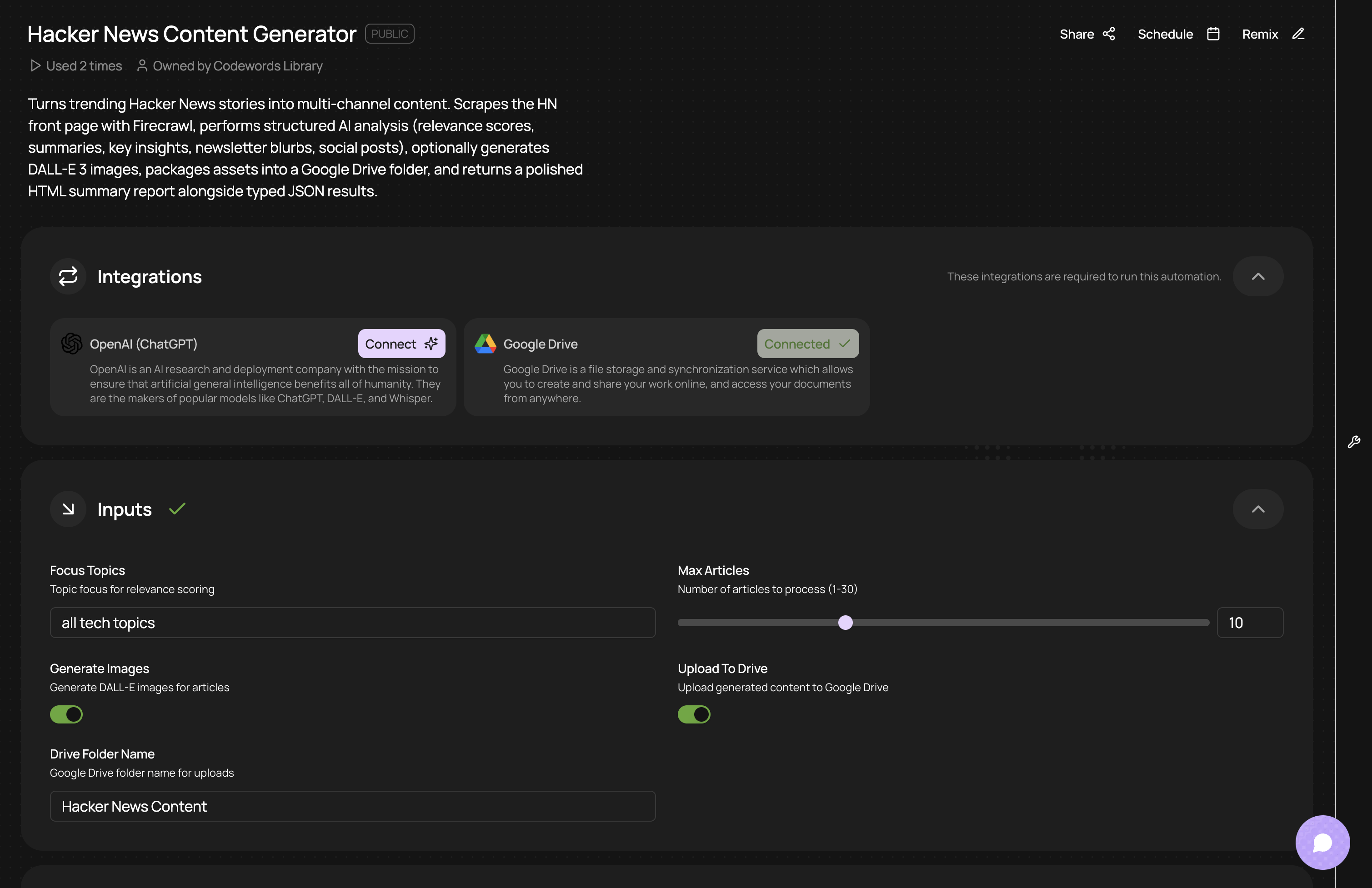
CodeWords Workflow: AI-Powered Content Curation
Original prompt: Generate content ideas from the latest Hacker News articles.
Input: Focus topics, number of articles to analyze, image generation, include uploads to Google Drive.
Output: A multi-step workflow is built. It schedules a recurring trigger, queries the Hacker News API, passes the top 5 URLs to an AI model for summarization, formats the output, and sends a message to a specific Slack channel.
Impact: Saves the marketing team approximately 2 hours of manual research and summarization each week, ensuring a consistent flow of relevant content ideas.
What are the best practices for implementing orchestration?
A brilliant strategy can fail with poor execution. Implementing workflow orchestration is not just flipping a switch; it is laying a foundation for scalable operations. A thoughtful approach that combines technical design with business needs is required. You might think you can orchestrate a massive process from day one. Here’s why that’s not a good idea: you risk building a tangled system that is as painful to manage as the manual chaos it replaced.
Treat this as a strategic project. Start with a clear business problem, design for failure, and build for future growth.
Start small and solve a real problem
Many teams try to boil the ocean. Instead of orchestrating a massive, company-wide process immediately, find a single, high-impact problem causing tangible pain.
Look for a process that is:
- Repetitive and Rule-Based: Tasks that follow a predictable path are easiest to define.
- Prone to Human Error: Any process involving manual data transfer between systems is a perfect candidate.
- High-Volume: Orchestrating something that runs hundreds of times a day delivers a larger and faster return.
By focusing on a specific pain point first, you can demonstrate value quickly and build momentum for larger projects.
Design for failure
Here is a hard truth: things will break. APIs will go down, data will arrive in the wrong format, and networks will fail. A smart orchestration strategy anticipates these problems from the beginning. Building robust error handling is a core design principle.
Your workflows must gracefully manage exceptions without halting the entire process. This means implementing key mechanisms:
- Automatic Retries: For temporary issues like a brief API outage, configure the task to retry a few times with a short delay.
- Alerting and Notifications: When a workflow fails, the appropriate team needs to be notified immediately via Slack or email with details of the error.
- Dead-Letter Queues: Send failed tasks to a special queue for manual review to ensure nothing is lost.
Build modular and reusable components
A common mistake is creating monolithic "god workflows" — large, sprawling processes that attempt to do everything in a single flow. These are difficult to debug, maintain, and update.
A better approach is to think like a builder with LEGOs. Break down complex processes into smaller, modular, and reusable sub-workflows. For example, create one "Create New User" workflow that any other process can call when needed. For a deeper look, see these best practices for creating workflow automations with CodeWords.
This modular design offers significant advantages:
- Easier Maintenance: Changes to a process, like user creation, only need to be updated in one place.
- Faster Development: New workflows can be assembled quickly by combining existing components.
- Improved Readability: Small, focused workflows are easier for your team to understand and manage.
The implication of this approach is a more resilient and agile operational backbone. By starting small, planning for failure, and building with modularity, you create an orchestration layer that is not just powerful but also sustainable, setting you up to scale automation across your entire organization.
FAQs about workflow orchestration
What's the difference between workflow orchestration and RPA?
Robotic Process Automation (RPA) mimics repetitive human actions on a user interface, like copying data. Workflow orchestration is the central controller that manages end-to-end processes, coordinating RPA bots, API calls, and human tasks.
Can orchestration handle dynamic or changing workflows?
Yes. Modern orchestration platforms are designed to adapt in real-time. They can alter their path based on incoming data or the outcomes of previous steps, making them ideal for complex, unpredictable processes like AI-powered research.
How do I start with workflow orchestration without a large technical team?
You don't need a large team. Begin by identifying a single, high-pain manual process. Use a low-code platform like CodeWords, which is designed for operators, to define the business logic in plain language. Solve one real problem to demonstrate value, then build from that success.
The shift to an orchestrated model is the true engine of operational scale. It's about building a digital nervous system that can adapt and grow with your business.
Start automating now