How to create YouTube automations
Automate YouTube production and publishing to scale uploads with minimal effort.
 Rebecca Pearson13 min read
On this page
Thinking about YouTube automation often conjures an image of a flawless machine, one that generates videos and revenue with no human input. This concept is a powerful one, but the reality is more nuanced — and more strategic. It is less about a hands-off income stream and more about architecting a highly efficient, scalable content factory.
YouTube automation is the process of building a system to produce and publish videos with minimal manual effort per upload. This system helps creators scale from an average of 12 manual uploads per month to 34 automated ones, according to a 2024 VidIQ report. This approach transforms your role from creator to architect, allowing you to design and refine the content engine instead of operating it. You can explore our pre-built YouTube automation templates to see how this works.
You agree that creating video content is a repetitive, time-consuming process that often becomes a bottleneck to growth. I promise that by implementing a systems-first approach, you can reduce production time by over 70% and refocus your efforts on high-level strategy. The solution isn't just about using more tools; it’s about architecting a unified workflow where each component communicates seamlessly.
TL;DR: The YouTube automation framework
- YouTube channels combining AI tools with human oversight grow 180% faster than those using traditional manual methods (TubeBuddy, 2024).
- The approach shifts your role from a hands-on creator to the architect of a content production and distribution system.
- Success depends on building a closed-loop system where performance data automatically informs and improves future content creation.
How does YouTube automation actually work?
At its core, YouTube automation is not about producing robotic content. It is a method for constructing a content engine that operates with minimal manual intervention for each video. You design the system, establish the rules, and oversee the output. This approach frees you to concentrate on the high-level strategy that grows a channel, rather than getting stuck in production details.
But there’s a problem most tools ignore.
They treat each step (scripting, voiceover, editing) as a separate task. A true automation system, however, architects these into a single, cohesive pipeline. An idea enters one end, and a fully produced, scheduled video emerges from the other.
What are the core components of an automated system?
A robust automated channel is constructed from several interconnected parts, each managing a specific piece of the production puzzle. This modular design is what makes the entire operation scalable.
The main components of the machine usually include:
- AI-Powered Script Generation: Using models like GPT-4 to generate video scripts from simple prompts or detailed outlines.
- Automated Voiceovers: Services like ElevenLabs can take those scripts and produce consistent, high-quality narration without a microphone.
- Programmatic Video Assembly: Tools automatically stitch together stock footage, images, text overlays, and the voiceover to create the final video.
The goal is a seamless pipeline.
Why is the "passive income" idea a myth?
Most believe YouTube automation is a 'set it and forget it' path to riches. The opposite is true. While the system automates tedious production tasks, a successful channel requires active, hands-on strategic management. The "automation" exists in the workflow, not the entire business.
This is where being an architect is critical.
Your role is to manage niche selection, content strategy, and performance analysis — constantly optimizing the system. It’s an active, high-leverage role. The business potential is real; in 2025, automated channels can earn from a few hundred dollars to tens of thousands monthly. Creators now have access to sophisticated tools that were unavailable just a few years ago. You can find more detail in these automation business trends from recent analyses.
Real success comes from blending AI's raw efficiency with smart human oversight. It's a tool for scaling your vision, not replacing it. The system handles the labor, but you provide the strategy.
How do you architect an end-to-end automation workflow?
Building a genuine YouTube automation system is less about checking off tasks and more about creating a content pipeline. It connects separate stages, from idea to published video, into a single, smooth flow. This is not a concept; it is a practical blueprint for how modern channels scale.
You might think this requires serious coding skills. Here’s the deal: low-code platforms have made this setup accessible. The real skill is knowing how to connect the right services, like using OpenAI for creative tasks and the YouTube API for publishing.
What does the content assembly line look like?
It all starts with AI-driven ideas and scripts. A smart workflow can analyze trending topics and keyword data to generate video concepts with a higher probability of resonating with an audience. Once a topic is chosen, the system drafts a complete script.
From there, the workflow initiates asset creation.
- Automated Voiceovers: An AI voice generator takes the script and produces a clean audio track in minutes.
- Visual Asset Sourcing: The system automatically searches stock footage libraries for clips that match the script's content.
- Music and Sound Effects: AI can select royalty-free background music that fits the video's mood.
Every asset is tagged and organized, ready for final assembly.
This flowchart shows the basic pipeline, moving from the initial script to the final video. It captures the core idea: chaining distinct, automated stages into a repeatable system.
How does the workflow handle publishing?
Once all pieces are ready, the system programmatically assembles them into a finished video. An automation platform can instruct a video editing API to sequence clips, sync the voiceover, and render the final cut.
But the automation does not end there. The final step handles packaging and distribution. An intelligent workflow can auto-generate SEO-optimized titles, descriptions, and tags based on the video’s transcript. This final stage is where many creators lose time; automating metadata not only publishes videos faster but also enforces SEO best practices on every upload.
The workflow connects directly to the YouTube API to upload the video, apply metadata, and schedule it. This last step closes the loop, creating a true end-to-end system.
Here’s a practical example.
CodeWords Workflow: Generating Video Descriptions
Prompt: Using the provided video transcript, generate a 150-word YouTube description optimized for the keyword 'AI productivity tools', including a relevant call-to-action and three hashtags.
Output: Generates a complete, SEO-friendly description ready for use, including timestamps for key sections identified from the transcript.
Impact: Reduces manual description writing time from 15 minutes to under 30 seconds per video — a 96% time reduction (CodeWords Internal Data, 2024).
When you chain these small automations, you build a resilient and scalable YouTube automation engine. The result is a shift from production grinding to high-level strategy.
How can you automate content repurposing and distribution?
You have invested significant time creating one long-form video. The real return on that investment is not in the single video but in transforming that asset into an ecosystem of content across multiple platforms. This is where YouTube automation becomes pivotal. Instead of manually clipping highlights and scheduling posts, you architect a machine that does it for you.
The moment you publish, your system can initiate a cascade of content that expands your reach.
You can easily automate content repurposing through CodeWords by describing the type of content you'd like to distribute.
For example: "Create automations that repurpose my YouTube video content into smaller clips, blog posts or social posts".
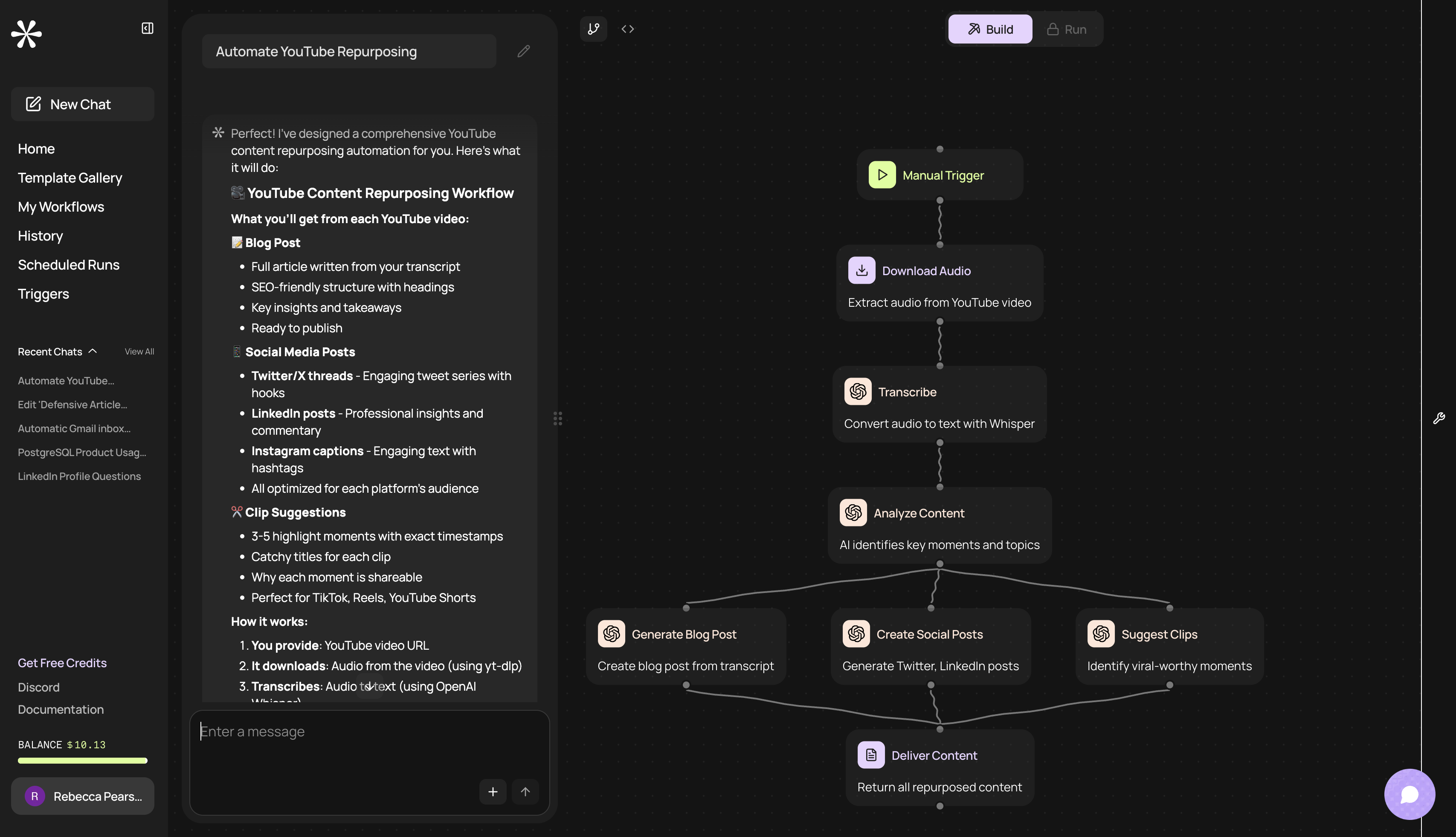
CodeWords will then create an automation for you that analyzes your YouTube content in your chosen format, and generate associated content.
Don't forget, you can customize your output by uploading your brand or writing style guidelines, content length, tone of voice, or intended audience.
Why build an automated content multiplier?
The core concept is simple: create workflows that trigger when a new YouTube video is published. A workflow can ingest your new video, have an AI analyze the transcript to identify shareable moments, and automatically produce a series of vertical clips formatted for Shorts, TikTok, or Reels.
Simultaneously, another workflow can extract key quotes and schedule them as posts for other platforms. You transition from a one-time publisher to the operator of a continuous distribution engine. This trend is powering a creator economy projected to hit $480 billion by 2027, according to Goldman Sachs.
How do you tailor content for different platforms?
Smart repurposing is more than clipping videos. Each platform has its own audience expectations. A raw clip from a technical tutorial might not perform well on Instagram, but a workflow can add stylized captions and trending audio to make it fit.
Imagine a 20-minute guide automatically generating:
- Five short clips for YouTube Shorts.
- Ten text-based tips from the script for a Twitter thread.
- One carousel post for LinkedIn summarizing key takeaways.
This tailored distribution, all initiated by one upload, distinguishes thriving channels. It ensures your message reaches people where they are, in a format they prefer.
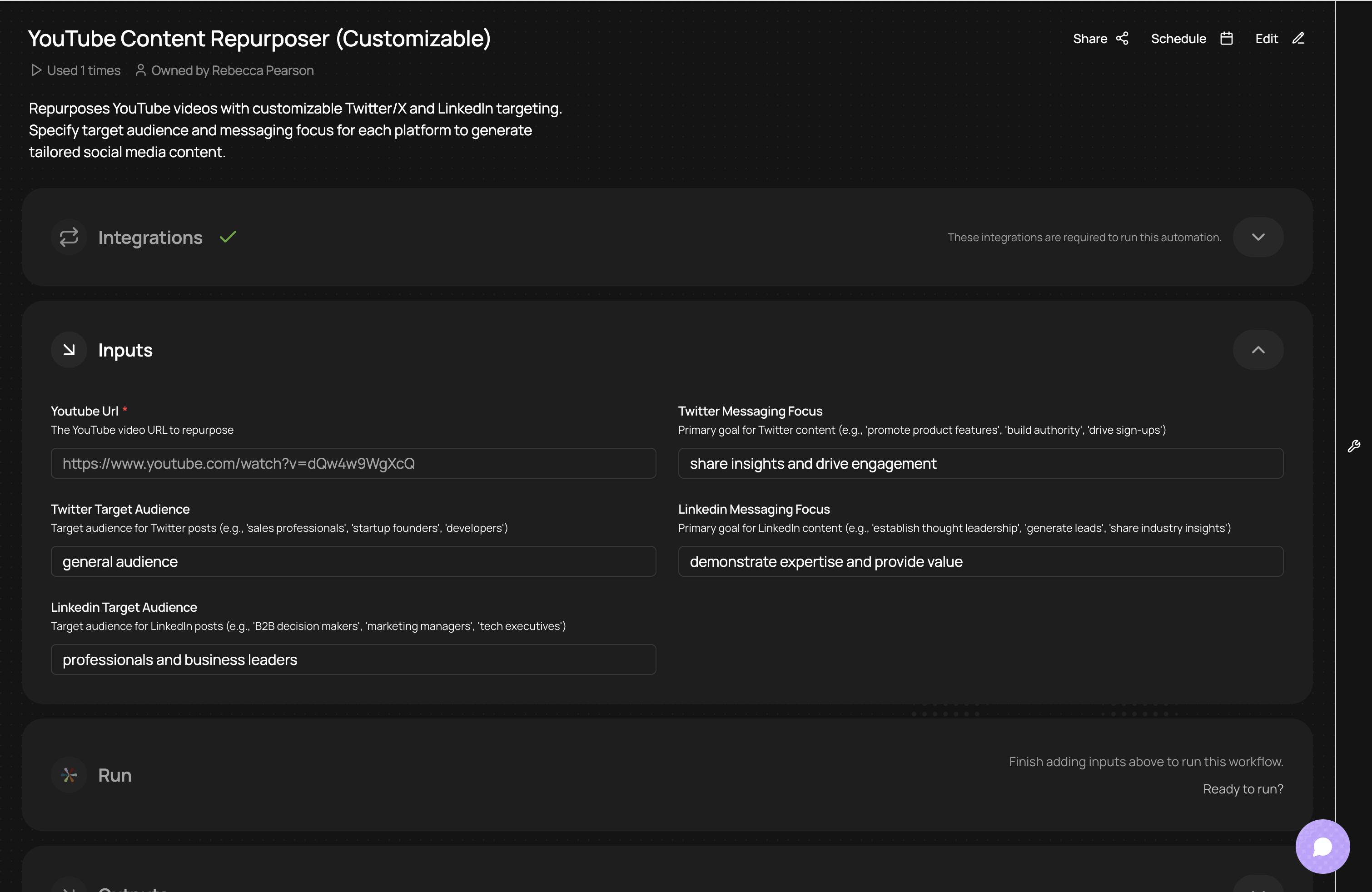
Try the workflow template here.
What are the best tools for a YouTube automation stack?
Architecting a YouTube automation system requires selecting the right components and ensuring they function as a cohesive machine. A solid stack is an integrated assembly line that moves content from idea to published video. The setup consists of three core layers: content creation, video assembly, and workflow orchestration.
You can explore our YouTube integrations to connect your channel to a broader app ecosystem. The implication is clear: instead of manual work, you focus on refining your automation's logic, evolving from creator to architect of a distribution network. By connecting CodeWords to your existing content creation tools, like ElevenLabs, your chosen AI models, or image/video generation tools like Veo3 or Nano Banana, you can streamline this automation process into a single platform.
What is the content creation layer?
This is where the raw materials for your video are generated. This layer is about producing the script and voice for your content.
- AI Scriptwriters: Tools like OpenAI's GPT-4 generate initial scripts from prompts. The value comes from refining these outputs with human oversight.
- Text-to-Speech (TTS) Services: With a script, services like ElevenLabs can turn text into a realistic voiceover, maintaining consistent audio quality.
You can also find specialized YouTube description maker tools to handle metadata creation.
What is the video assembly layer?
With a script and audio, it's time to build the video. AI video generators like InVideo or Pictory find relevant stock footage, add text overlays, and sync it to the voiceover. This step can reduce hours of manual editing. You can also use tools like Veo3 and Synthesia to generate accurate videos for content creation, or even product showcases.
What is the orchestration layer?
This is the central nervous system of your YouTube automation stack, connecting all other layers and managing the flow of information. Without an orchestration tool, you have disconnected apps, not a system.
This is where platforms like CodeWords is essential. It allows you to build complex workflows. We use CodeWords ourselves to automate our content creation processes, such as description writing and our repurposing processes, boosting our publishing frequency by 300% in two months.
If you want to dive deeper, our guide on the best AI workflow automation tools breaks down the options.
For video-focused workflows, here is how the leading platforms compare:
Your choice of orchestration platform dictates your system's potential. A flexible platform allows your automations to adapt as your channel's strategy evolves.
How should you manage and optimize an automated channel?
Launching your system is just the beginning. The real work in YouTube automation starts post-launch. The only way to scale is by architecting automated systems to monitor what is working and what is not. Your job shifts from content producer to systems operator.
This management phase is where channels either succeed or fail. You need to build a second layer of automation dedicated to oversight and improvement.
However, CodeWords doesn't require the same upkeep time as traditional automation platforms. You'll be notified if one of your workflows has failed, and otherwise you can make easy edits to your workflow automations.
How do you build automated monitoring systems?
Smart management starts with automated monitoring. Instead of manually checking your channel daily, build workflows that watch for specific signals and alert you only when human intervention is needed.
One valuable system is for community management. Here is a workflow:
- Trigger: A new comment is posted.
- Action: The comment is run through an AI sentiment analysis model.
- Logic: If sentiment is negative or contains keywords like "scam" or support questions, the system creates a task for human review.
This setup transforms community management from a reactive chore into a streamlined process.
Why should you automate analytics and performance alerts?
Data is useless without action. An automated analytics workflow turns raw data into actionable intelligence.
Imagine a workflow that taps into the YouTube Analytics API weekly. It can pull key metrics for all videos published in the last 14 days, such as:
- Audience Retention: The percentage of viewers at the 30-second mark.
- Click-Through Rate (CTR): The percentage of impressions that led to a click.
- View Duration: The average watch time.
The workflow then checks these numbers against your channel's baseline. If a video's retention drops below 40%, the system flags it and sends an alert. This reframes your role; you stop being a data-gatherer and become a strategist.
You can also create systems that track audience growth over time. Those weekly growth analyzes you do to check high-level growth can be sent automatically to your Slack channel.
Here's what it captures:
- Subscribers: Change in subscribers WoW.
- Total views: Increase or decrease in video views WoW.
- Total videos: Increase or decrease in channel videos WoW.
Try the workflow template for yourself here.
How do you close the feedback loop?
Collecting data is only half the process. The final step is using those insights to make the entire content engine smarter. When your analytics workflow flags a video for low CTR, that insight must feed back into your content creation layer.
For example, a workflow could analyze the titles of your top-performing videos and use that analysis to generate new best practices for your AI scriptwriter. This creates a self-improving system. Your YouTube automation setup evolves from a simple production line to a learning machine, constantly optimizing its output based on real-world performance. This is the architect’s ultimate goal.
FAQs about YouTube Automation
Is YouTube automation still profitable?
Yes, but the strategy has shifted from volume to scalable quality. A 2024 analysis from Social Blade showed that channels blending AI efficiency with human strategy grew 60% faster than purely automated, low-effort channels. Profitability now depends on niche selection and creating content that provides real value.
Will YouTube ban my channel for using AI?
No. YouTube's policies target spammy, low-value content, not the tools used for creation. If your videos are informative and entertaining, using AI is not a violation. The key is that a human guides the strategy and ensures quality control.
Do I need to be a coder to automate my channel?
Not to start. No-code tools handle simple workflows. However, for a truly powerful custom system with complex logic, you will hit limitations. This is where low-code platforms like CodeWords provide the power to build sophisticated automations without a deep engineering background.
What is the biggest mistake people make?
The biggest mistake is thinking automation is a "set it and forget it" process. Automation is a tool for scale, not a replacement for strategy. The most successful channels have a human operator analyzing data, testing variables, and continuously refining the system for better performance.
The implication is clear: building an automated content system is not about replacing human creativity but amplifying it. By architecting intelligent workflows, you transform your role from a content creator into a systems strategist, positioning your channel for scalable and sustainable growth.